UPSC News
UPSC New Photo & Signature Rules 2026: Dos and Don’ts
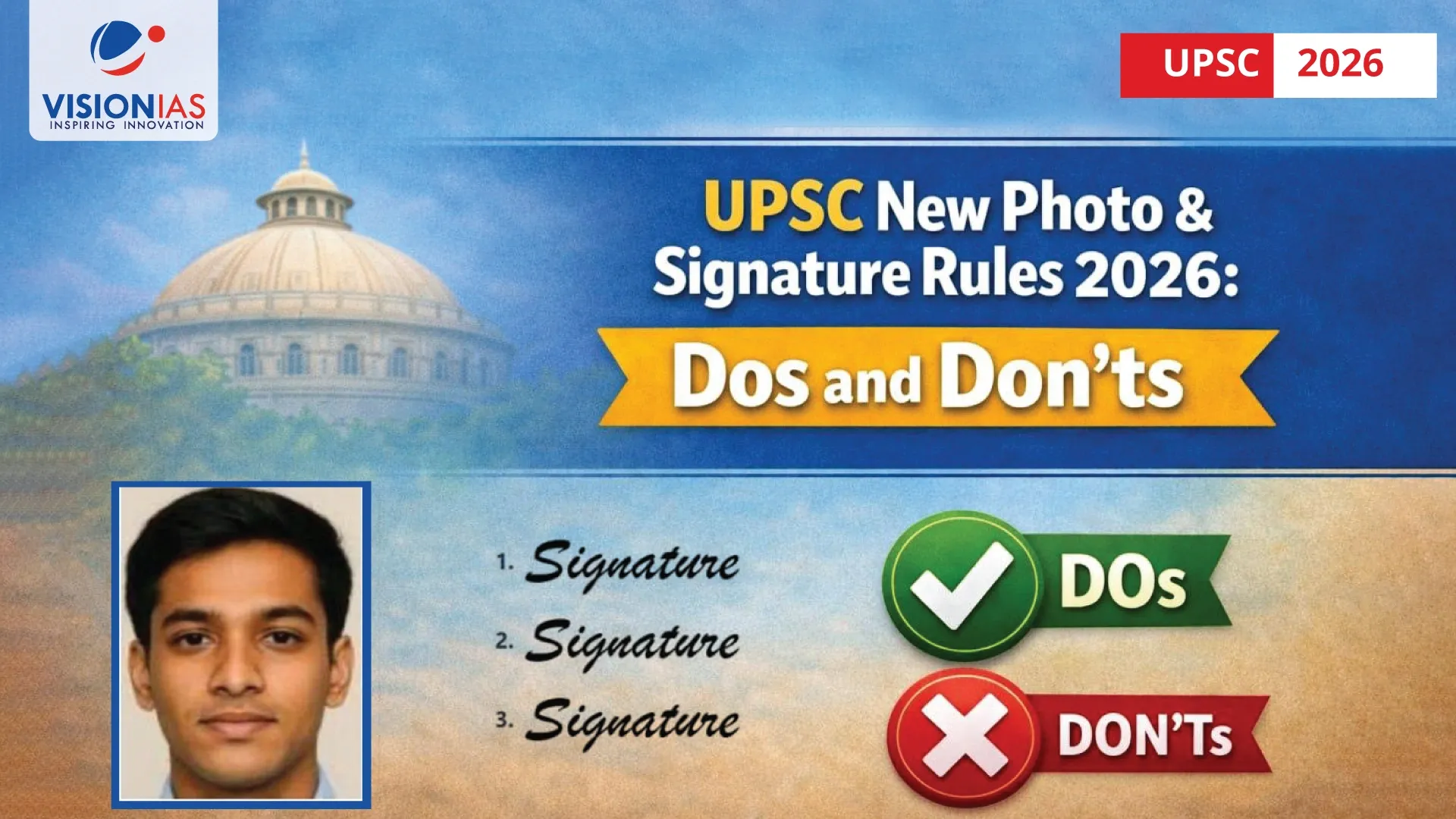


















The UPSC Civil Services Examination 2026 application process introduces strict and clearly defined rules for uploading photographs and signatures.
Any deviation from the prescribed UPSC photo signature rules 2026 can directly lead to application rejection, even before the examination stage begins.
Over the years, a significant number of applications have been rejected due to avoidable errors in photo and signature uploads. To prevent this, the Union Public Service Commission has issued detailed, non-negotiable guidelines for the 2026 cycle

Why Photo & Signature Rules Matter in UPSC 2026
The UPSC online application system now uses image validation and live photo matching to ensure candidate authenticity. If the uploaded passport-size photograph does not match the live photograph captured during form filling, the application will not proceed further.
This makes compliance with UPSC form photo signature dos and don’ts critical—not optional.
UPSC Photo Upload Rules 2026: What You Must Follow
The photograph uploaded in the application form must meet all of the following conditions:
Core Photo Specifications
- Format: JPG
- File size: 20 KB to 200 KB
- Recent, clear, colour photograph
- Plain white background
- Filename: photo
Face Coverage & Alignment (Most Common Rejection Reason)
- Face must cover at least 75% (3/4th) of the photo area
- Full frontal view, looking directly at the camera
- Head centered, both ear lobes clearly visible
- Eyes open and visible
- Natural expression (no exaggerated facial expressions)
Sample Photo with acceptance/rejection status
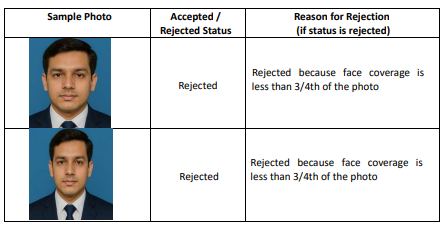
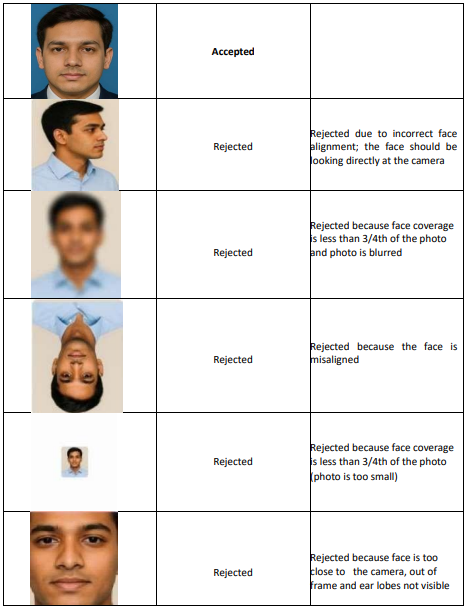

UPSC Photo Upload: Dos and Don’ts
Failure to follow these rules is a leading cause of UPSC application rejection due to photo signature errors
Live Photograph Rule: A Critical New Step
For UPSC 2026, capturing a live photograph is mandatory during application submission.
- Can be captured via:
- Device webcam, or
- Mobile phone using QR code
- Must be taken in good lighting
- Face must be clearly visible
- Live photo is matched with uploaded passport photo
If the system detects a mismatch between the live photograph and the uploaded image, the candidate cannot proceed further in the application process
UPSC Signature Upload Rules 2026 (Triple Signature Requirement)
UPSC has prescribed a triple-signature format, which many candidates overlook.
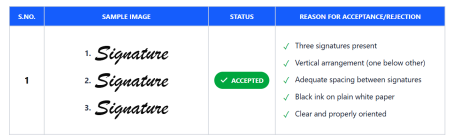
Signature Preparation Rules
- Sign three times, one below the other
- Use black ink only
- Sign on plain white paper
- Adequate spacing between each signature
- Scan all three signatures in one single image
Technical Specifications
- Format: JPG
- File size: 20 KB to 100 KB
- Image dimensions: 350–500 pixels
- Filename: signature
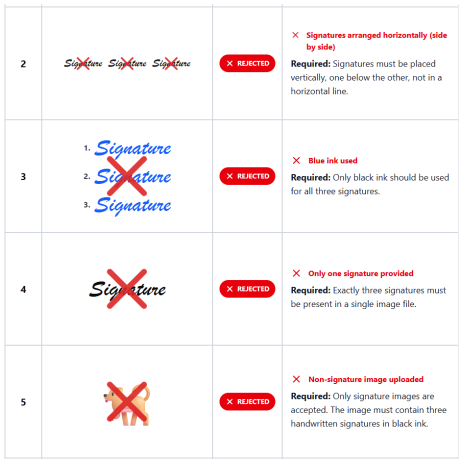
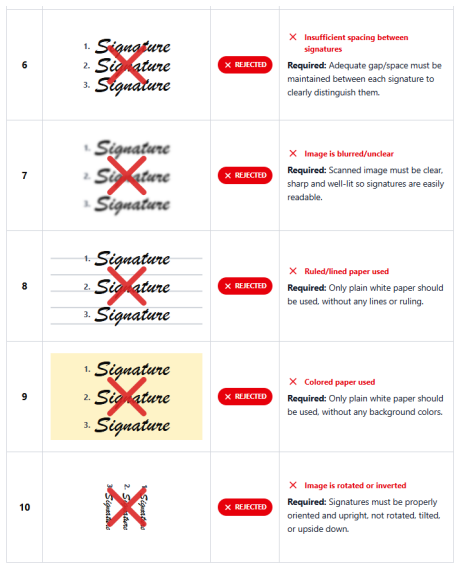
Sample Signature with acceptance/rejection status
Signature Upload: Common Mistakes That Lead to Rejection
UPSC clearly states that applications will be rejected if the signature image:
- Contains fewer or more than three signatures
- Is arranged horizontally instead of vertically
- Uses blue ink
- Is blurred, rotated, or poorly lit
- Is scanned from ruled or coloured paper
- Uploads a non-signature image
These errors fall squarely under UPSC application rejection photo signature issues
Click to read UPSC instructions for filling the photo & signature profile
Final Checklist Before You Upload
Before clicking “Submit,” ensure that:
- Passport photo meets 3/4th face coverage rule
- Live photo matches uploaded photograph
- Signature image contains exactly three black-ink signatures
- File size and dimensions are within limits
- Images are upright, clear, and properly named
Following the official UPSC application photo signature guidelines carefully ensures that your application moves smoothly to the examination stage—without unnecessary rejection at the very first step.
Also Read, UPSC 2026 Notification is Out : Key Dates, Eligibility and What Aspirants Should Do Next
Must Read, UPSC Notification 2026 Explained: New Changes, Form Filling Process, and Mistakes to Avoid
Also Read, UPSC Cadre Allocation Policy 2026 for IAS, IPS & IFoS: Rules, Procedure & Download PDF